Timing / Performance issues on macOS 26 Tahoe

Here are the results of a test with the latest code from you GitHub. Same computer and OS, fixed to 60Hz, with a reboot, check that it was still set at 60Hz and then running the code. FYI: all the test I have reported are on battery (can easily run plugged in if needed).

PTB-INFO: Psychtoolbox license is active on this machine for 135 more days until Wed Apr 8 13:58:09 2026
PTB-INFO: Up to 119 more days of offline use without internet connection, or offline reactivation, are possible until Mon Mar 23 17:09:50 2026
XXXXX

PTB-INFO: This is Psychtoolbox-3 for Apple macOS, under Matlab 64-Bit ARM (Version 3.0.22 - Build date: Jul 8 2025).
PTB-INFO: OS support status: macOS 16 Apple Silicon is not yet tested or supported at all for this release..
PTB-INFO: For information about paid support and other commercial services, please type ‘PsychPaidSupportAndServices’.
PTB-INFO: Most parts of the Psychtoolbox distribution are licensed to you under terms of the MIT license, with some
PTB-INFO: restrictions. See file ‘License.txt’ in the Psychtoolbox root folder for the exact licensing conditions.
PTB-INFO: Psychtoolbox and its prebuilt mex files are distributed in the hope that they will be useful, but WITHOUT
PTB-INFO: ANY WARRANTY; without even the implied warranty of MERCHANTABILITY or FITNESS FOR A PARTICULAR PURPOSE.

PTB-INFO: OpenGL-Renderer is Apple :: Apple M3 Pro :: 2.1 Metal - 90.5
PTB-INFO: Renderer has 28753 MB of VRAM and a maximum 28753 MB of texture memory.
PTB-INFO: Screen 0 : Window 10 : VBL startline = 2234 : VBL Endline = -1
PTB-INFO: Will try to use mechanisms in the external display backend for accurate Flip timestamping.
PTB-INFO: Reported monitor refresh interval from operating system = 16.666667 ms [60.000000 Hz].
PTB-INFO: All startup display tests and calibrations disabled. Assuming a refresh interval of 60.000000 Hz.

PTB-INFO: Psychtoolbox imaging pipeline starting up for window with requested imagingmode 3146753 …
PTB-INFO: Will use 8 bits per color component framebuffer for stimulus drawing.
PTB-INFO: Will use 8 bits per color component framebuffer for any stimulus post-processing.
PTB-INFO: No image processing needed. Enabling zero-copy redirected output mode.

The refresh interval reported by the operating system is 16.66667 ms.

Measured refresh interval, as reported by “GetFlipInterval” is 16.66667 ms. (nsamples = 1, stddev = 0.00000 ms)

PsychHID-ERROR: Could not enumerate and attach to all HID devices (HIDBuildDeviceList(0,0) failed)!
PsychHID-ERROR: One reason could be that some HID devices are already exclusively claimed by some 3rd party device drivers
PsychHID-ERROR: or applications. I will now retry to only claim control of a hopefully safe subset of devices like standard
PsychHID-ERROR: keyboards, mice, gamepads and supported USB-DAQ devices and other vendor defined devices and hope this goes better…
PsychHID-INFO: That worked. A subset of regular mouse, keyboard etc. input devices and maybe some vendor defined devices will be available at least.

PsychVulkanCore-ERROR: PsychPresent(1): Failed to retrieve visual stimulus onset timestamp! Timed out.

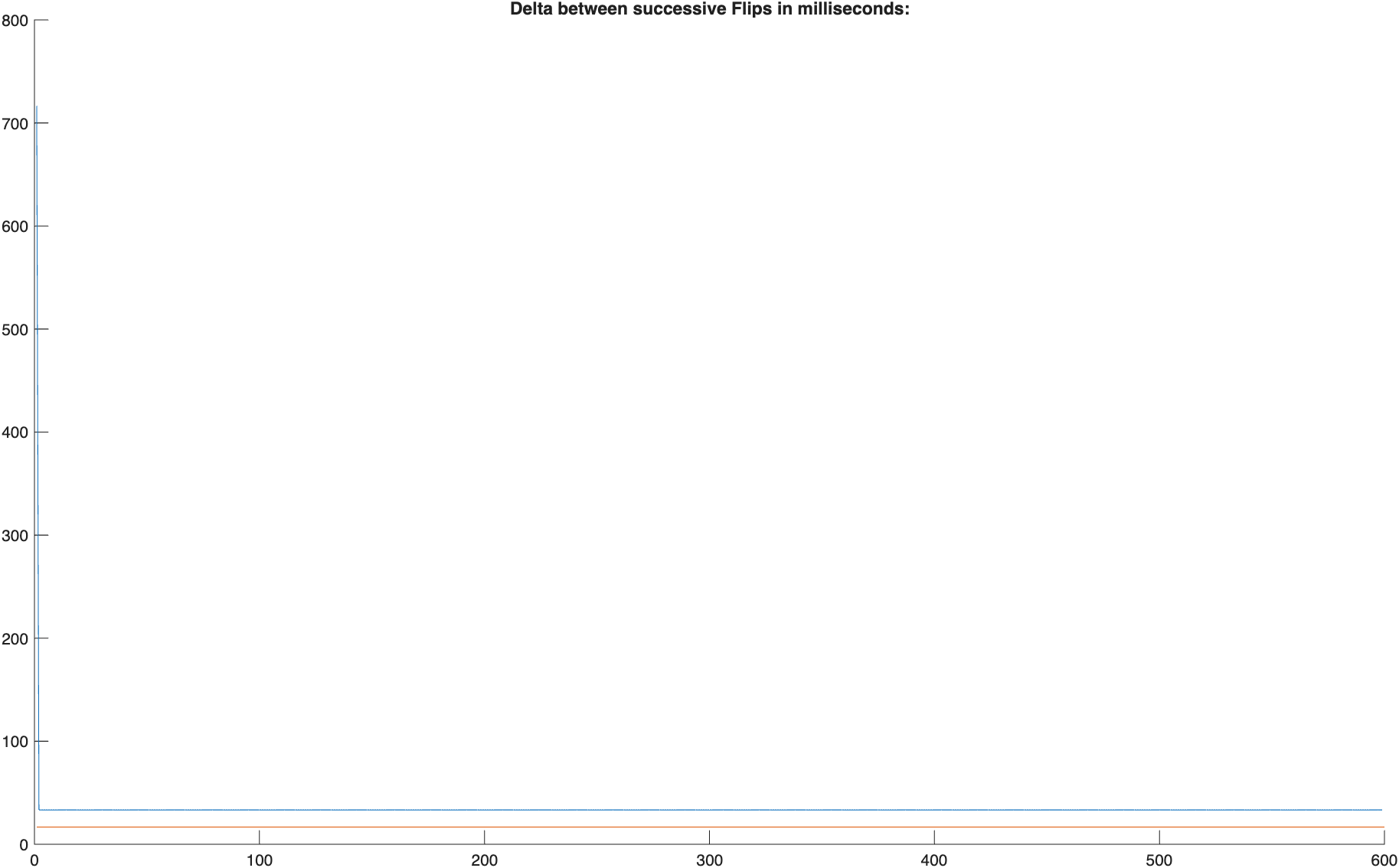
PTB missed 599 out of 600 stimulus presentation deadlines.
One missed deadline is ok and an artifact of the measurement.
PTB completed 0 stimulus presentations before the requested target time.
Have a look at the plots for more details…
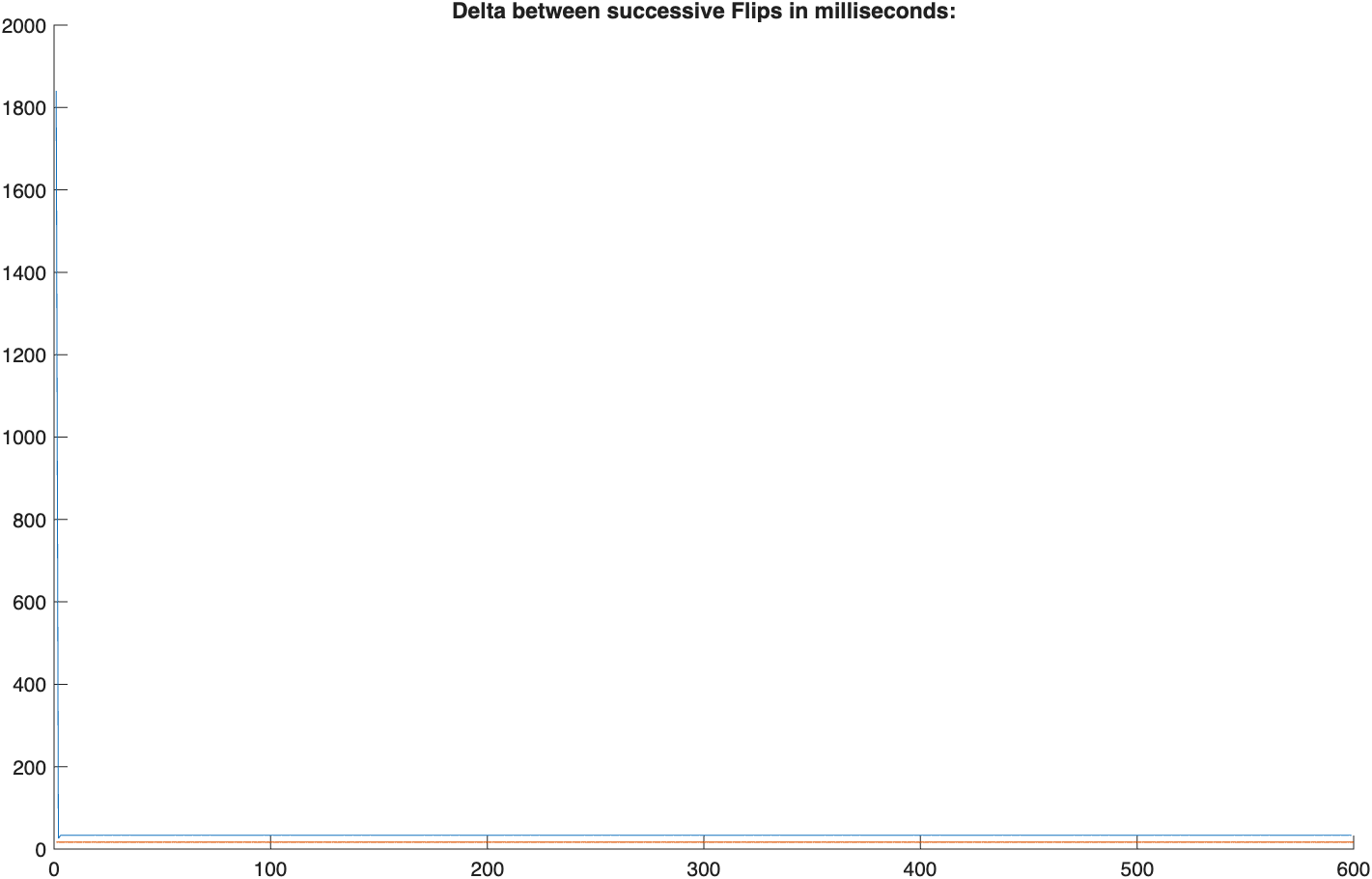
Thanks. Now that’s performing just as bad a Keith machine.

VS Studio code has been fixed in its latest version according to the info I posted, I don’t know if that’s true of the Dropbox client? Quitting Dropbox - I haven’t used it in a long time, but assume it runs some auto-starting client in the background? Checking with “Activity Monitor” App if any processes use a large amount of gpu, e.g., WindowServer process.

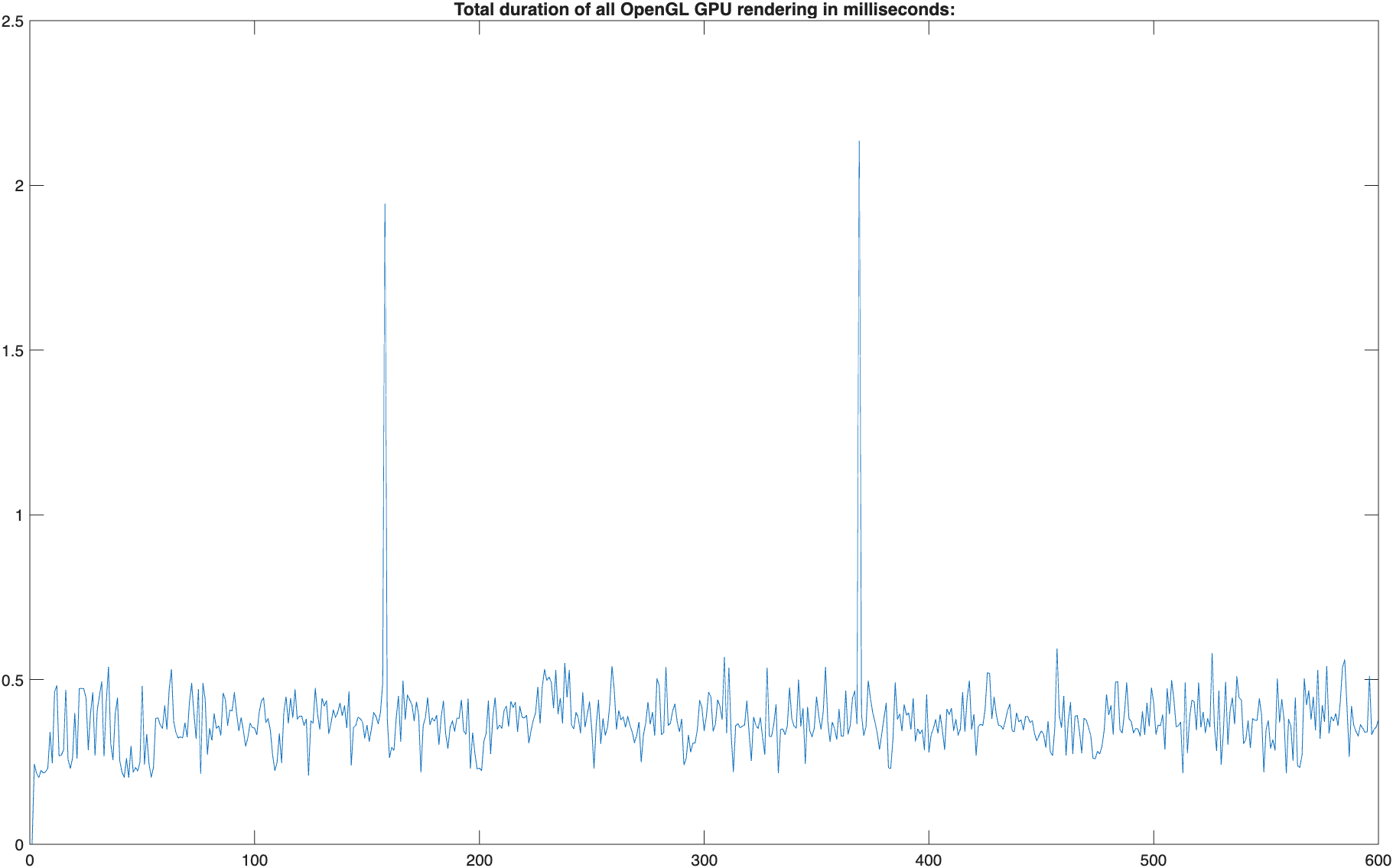
Things to try would be the stuff mentioned in the previous posts, e.g., the new VBLSyncTest.m as VBLSyncTest([],[],[],[],[],[],[],[],[],1); to get the new additional OpenGL gpu processing time plot. Or checking how KbCheck’s are doing performance wise a la multiple runs of tic; for i=1:1000, KbCheck; end; toc.

The most important bit of info for PTB would be to run MTL_HUD_ENABLED=1 octave from a terminal, or trying the same with Matlab in nodesktop mode, ie. something like:

MTL_HUD_ENABLED=1 /Applications/MatlabR2025a.app/bin/matlab -nodesktop

Matlab may just hang, it always hangs for me when started with regular GUI, but I think it sometimes worked when started without GUI.

If it worked, you’d get exactly one execution of VBLSyncTest where some HUD display shows overlaid over the stimulus image, in the top right corner, with some info about Metal gpu performance. One has to quit and restart Octave/Matlab after one run, as the HUD doesn’t work on any followup invocation - the magic of Apples great debugging tools. The most important bit of info is if it reports “Direct” mode or “Composited” mode during most of the VBLSyncTest run, although other reported numbers like “gpu” time would be useful.

“Direct” mode is what allows to run at maximum framerate, “Composited” mode is a killer for performance, only allowing to run at most at half the video refresh rate, ie. 30 fps on a 60 Hz display. If that would be broken, it would explain the results, but also I wouldn’t know of any way to fix it, as that would be a macOS bug.

If “Direct” mode is used, then the performance killer is somewhere else, e.g., too long Metal gpu processing, or too long OpenGL gpu processing, or nothing related to graphics at all, e.g., extremely slow KbCheck’s - although VBLSyncTest.m is already optimized to minimize their execution time. Ofc. removing KbCheck statements from VBLSyncTest.m’s inner test loop would avoid that.

Here are the KbCheck results. This was after running “clear all”.

I will try and get the rest of the tests done today / tomorrow.

Thanks

P

>> tic; for i=1:1000, KbCheck; end; toc

PsychHID-ERROR: Could not enumerate and attach to all HID devices (HIDBuildDeviceList(0,0) failed)!
PsychHID-ERROR: One reason could be that some HID devices are already exclusively claimed by some 3rd party device drivers
PsychHID-ERROR: or applications. I will now retry to only claim control of a hopefully safe subset of devices like standard
PsychHID-ERROR: keyboards, mice, gamepads and supported USB-DAQ devices and other vendor defined devices and hope this goes better…
PsychHID-INFO: That worked. A subset of regular mouse, keyboard etc. input devices and maybe some vendor defined devices will be available at least.

Elapsed time is 1.447499 seconds.

>> tic; for i=1:1000, KbCheck; end; toc

Elapsed time is 0.852773 seconds.

>> tic; for i=1:1000, KbCheck; end; toc

Elapsed time is 0.843074 seconds.

>> tic; for i=1:1000, KbCheck; end; toc

Elapsed time is 0.904400 seconds.

>> tic; for i=1:1000, KbCheck; end; toc

Elapsed time is 0.847590 seconds.

>> tic; for i=1:1000, KbCheck; end; toc

Elapsed time is 0.844785 seconds.

>> tic; for i=1:1000, KbCheck; end; toc

Elapsed time is 0.845184 seconds.

>> tic; for i=1:1000, KbCheck; end; toc

Elapsed time is 0.844546 seconds.

>>

Outputs attached

Here is a photo with the HUD enabled.

First the FPS and Frame Interval jiggle a bit around these values, but quickly settle on FPS of 30 and Frame Interval of 33.33ms. As before the display has been fixed at a 60 Hertz refresh rate. So it looks like it is actually going 1/2 speed according to the HUD.

Thanks. The results are as useful as they are disappointing. According to these everything works optimally, nothing is broken and it should work at full performance ie. 60 fps.

Direct-To-Display mode is used, so the most likely culprit for the problem has been eliminated as not the cause of trouble. GPU hardware processing time for drawing + Flip is about:

OpenGL 0.5 ms (good) + Metal 1.48 ms (good enough) + DCP/macOS overhead 2 ms (worst operating system performance across all OS’es, poor even compared to macOS on Intel Macs, but still not bad enough to explain the problem at <= 120 Hz display refresh rate), so in total about 4 msecs for active graphics and display processing.

KbCheck takes about < 1 msec, maybe give another generous 1 msecs for the rest of the scripts processing, and we are at:

1 msecs Matlab time + 1 msecs KbCheck + 4 msecs for graphics/flip/display = 6 msecs out of a ~16 msecs time budget. And Direct to display mode is used, mostly eliminating most of the horror show that is the macOS compositor. With 10 msecs headroom this should work at full performance. So most plausible possible reasons for low performance have been eliminated, and now its pure guesswork and grasping at random straws :frowning: .

I also found a way to manually enable Gamemode with the help of some XCode command line developer tools and tested with Gamemode enabled: It didn’t make any difference at all - Not for this issue, not wrt. other performance enhancements. So Gamemode seems to be of no importance to Psychtoolbox use cases. So we can rule that out as culprit or cure as well.

Random things to try:

VBLSyncTest([],0,[],[],[],[],[],[],[],1); to try to trick Metal present scheduling into flipping earlier, in case macOS Metal’s gpu scheduling is somewhat broken. Maybe comment out the Priority() calls in VBLSyncTest.m to not use realtime cpu scheduling, in case macOS cpu scheduling is somewhat broken.

The DropBox client hasn’t been fixed for compatibility with macOS 26 yet, according to some Google search, so shutting that down, and any other app, maybe worth a try? Or running VBLSyncTest.m through Matlab’s profiler to see where Matlab thinks most time is spent in VBLSyncTest.m’s inner loop - that only measures cpu execution though. Grasping at straws…

Thanks Mario. I am snowed under with work ATM, but will check these various “grasping at straws” options as soon as I can. Hopefully within the week.

I only use macOS for developing (some) PTB code these days. Most of the development done with PTB is in the lab these days, which runs on Windows, due to the doing VR research.

One thought, this issue seems systematic, not some random error type issue. From my understanding the HUD and PTB agree, but this disagrees with the FPS set in “settings”? Possibly the “non random” nature of the issue might provide clues.

Sorry if this is dumb question, I have not had much time to expend on this other than running the various tests.

P

Ok, I got hooked.

I have tried a few things, powered versus on battery, closing every conceivable thing via activity monitor, various different refresh rates.

The only time the HUD agrees with the “settings” setting is if it is set to “promotion”. Every other refresh rate I have tried the HUD says 1/2 of what is requested in “settings”. At all times the HUD says “direct”.

I have not saved out all of the various PTB outputs due to time.

FYI running VBLSyncTest with any specified options results in an error when run with

MTL_HUD_ENABLED=1 /Applications/Matlab_R2025b.app/bin/matlab -nodesktop

For example

VBLSyncTest(,0,,,,,,,,1);

Fails in no desktop but works with desktop.

VBLSyncTest

Runs fine with both.

Apologies if I have made a dumb error somewhere, I am trying to be helpful but squeezing this in with another million jobs.

At this point, I think it might be worth a chat and a live debugging session. Going via here is very time consuming.

You know where I am.

P

Ok, thanks a lot. So at least Matlab R2025b also has new unrelated bugs in -nodesktop mode, cool!

I think we can do without the HUD, now that we know it doesn’t indicate any of the problems I thought it would indicate. And just run Matlab normally with GUI.

VBLSyncTest([], 0); would be interesting, just if it also misses most flips, or if that works, unlikely, but who knows? editing VBLSyncTest.m to remove the Priority() calls and run without realtime scheduling, in case realtime scheduling now does the opposite of making things realtime, in case Apple broke something there. I’m not sure I have any other ideas left to test for the time being. I also got the same problem, tons of timing sensitive work deadlines, and actually no time to really look into it right now. There’s lots of refinement work to be done for the older macOS versions, before I should tackle macOS 26 issues, unless they are super easy to diagnose and fix, which they are apparently not.

Maybe we should just put out a warning to not upgrade to macOS26 for the foreseeable future if timing + max fps matters in any way. It is not officially supported by PTB, so that is already the official advice, but people often don’t read the docs and do it anyway…

I will try and test further, but it will likely not be until the end of next week. In think macOS 26.2 will be out by then, so possibly that will fix things.

P

Hi Peter, thanks, but no hurry anymore. The only interesting test to run after an upgrade to macOS 26.2 would be VBLSyncTest([], 0) to see if it improved, after upgrading to the latest Psychtoolbox from my GitHub master branch. I doubt it will improve.

You can also try a new benchmark mode in PsychVulkan.m editing line 1069, one can set the benchmark = 0; to a non-zero value to run a test loop of benchmark trials, where it tries to present an all black screen as fast and efficient as possible and prints the timing stats and a plot at the end. This represents an artificial optimal case which can never be achieved in any real use case, just to see if it is possible at all to achieve 60 fps on a 60 Hz display. My result with that test was that one can’t.

I’ve bit the bullet and updated a MacBookAir M1, to which I only have time limited access a few times a year, to macOS 26.1 Tahoe. Results were equally poor. Spent a very work intense last week with over 60 hours of testing and hacking, so I pretty much know everything I needed to know. The machine is not with me anymore since Sunday, so I can’t do any further testing or hacking. This week I spent some time testing how macOS 13 on Intel MBP and macOS 14 on M2 Pro MBP behave, and I am about to finish last tests.

I strongly advise the macOS users, and especially users of Apple Silicon Macs against upgrading to macOS 26 Tahoe until further notice.

Apple introduced new bugs or limitations into Tahoe’s display system, at least for Apple Silicon, the status on Intel Macs is completely unknown. This will limit the maximum achievable framerate for animations or fast stimulus presentation to half the video refresh rate (or the minimum inter-stimulus-interval to twice the video refresh duration). Iow. on a 60 Hz display you can’t achieve animations with more than 30 fps, or stimulus durations shorter than 33.33 msecs! At least not with properly working, accurate, trustworthy timing and timestamping. If one disables proper Screen('Flip', ..., dontwait); timing by specifying the optional dontwaitflag as 1, one can get full performance + totally broken timing. Note that, based on my current knowledge after 10 days of investigation, this performance bug of macOS 26 will affect any vision science toolkit with proper timing and timestamping. The other toolkits with their totally broken timing on macOS in the first place, including to my knowledge all the Python based toolkits, may appear to behave correctly, but that’s just because their brokenness is triggering the same macOS behavior as using Psychtoolbox with the dontwait = 1 flag. The same is true when using an old and unsuitable Psychtoolbox 3.0.19 or earlier on macOS + Apple Silicon.

There are currently no known methods to work around this macOS 26 Tahoe bug, so not upgrading is the best course of action until further notice.